
无头浏览器
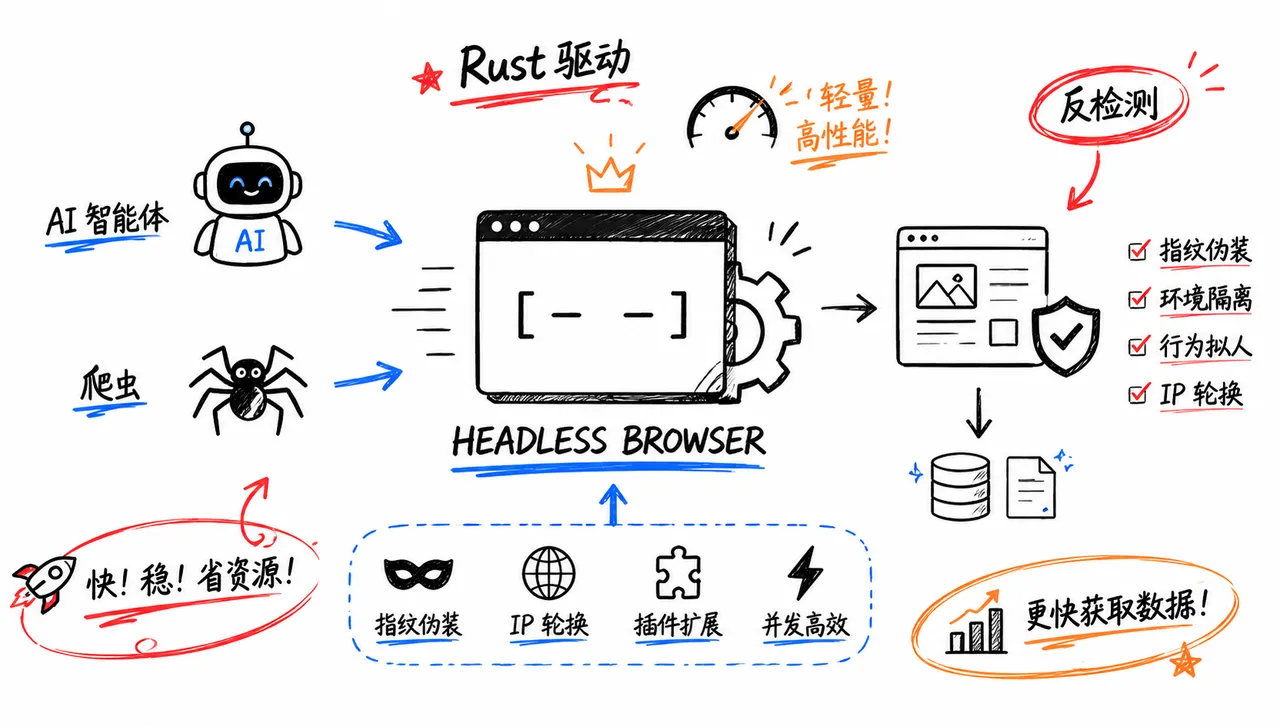
Rust 写的轻量无头浏览器引擎,为 AI 智能体和爬虫提供反检测自动化

Obscura



面向 AI 代理和网页抓取的开源 headless 浏览器。
轻量、隐身,且由 Rust 构建。
Obscura 是一个用 Rust 编写的 headless 浏览器引擎,专为网页抓取和 AI 代理自动化而构建。它通过 V8 运行真正的 JavaScript,支持 Chrome DevTools Protocol,并且可以作为 Puppeteer 和 Playwright 中 headless Chrome 的即插即用替代品。
为什么选择 Obscura 而非 headless Chrome?
专为大规模自动化而设计,而非桌面浏览。
| 指标 | Obscura | Headless Chrome |
|---|---|---|
| 内存占用 | 30 MB | 200+ MB |
| 二进制体积 | 70 MB | 300+ MB |
| 反检测 | 内置 | 无 |
| 页面加载时间 | 85 ms | ~500 ms |
| 启动速度 | 即时 | ~2s |
| Puppeteer 兼容 | 是 | 是 |
| Playwright 兼容 | 是 | 是 |
🎉 10,000 颗星星,接下来是什么?
我们正在开发 Obscura Cloud 托管版本,提供托管基础设施、住宅代理和专属支持。适用于希望使用引擎但不想自行运维的用户。
开源引擎保持 Apache-2.0 许可,功能完整。永远不会有功能限制。
赞助商
Obscura 得到赞助商的支持,帮助我们保持独立开发。
想要赞助?请发送邮件至 hello@obscura.sh。

|
🚀 Obscura × SX.org 使用 Obscura 进行 AI 代理、浏览器自动化或网页抓取?通过 SX.org 的稳定代理来增强您的工作流程。 🌍 覆盖 235 个国家的 1200 万+ IP 🏠 700 万+ 住宅 IP 📱 400 万+ 移动 IP 🏢 100 万+ 企业代理 🔁 轮换与会话保持 📍 灵活的 GEO 设置 🌐 支持 HTTP、HTTPS 和 SOCKS5 ⚡ 高达 99.97% 的连接成功率 🛟 7×24 小时支持 🎁 使用代码 Obscura3gb 获取 免费 3GB 试用。 稳定的代理,更少的拦截,最可靠的 Obscura 自动化。 |

|
NodeMaven — 最可靠的代理提供商,拥有市场上最高质量的 IP。专为自动化、网页抓取、SEO 研究和社交媒体管理而构建。 99.9% 可用性 最长 7 天的会话保持 每个代理均支持 IP 过滤 无需 KYC 流量返现 — 最高可返还 10% 🎁 使用代码 OBSCURA35 享受移动和住宅代理 35% 折扣,或使用 OBSCURA40 享受 ISP(静态)代理 40% 折扣。 |

|
🚀 Obscura × ProxyEmpire 使用 Obscura 进行 AI 代理、浏览器自动化或网页抓取?通过 ProxyEmpire 的可靠住宅和移动代理来增强它。 🌍 覆盖 170 多个国家的 3000 万+ 住宅 IP 📱 4G/5G 移动代理 🔄 轮换与会话保持 🎯 城市、地区与 ISP 定向 🔐 支持 HTTP、HTTPS 和 SOCKS5 🎁 使用代码 OBSCURA35 享受 35% 循环折扣。 更好的代理,更少的拦截,更可扩展的自动化。 |

|
9Proxy 提供住宅代理,起价仅为 $0.018/IP 或 $0.68/GB。覆盖 90 多个国家的 2000 万+ IP。支持会话保持或轮换,可通过桌面或移动应用管理。 |

|
Rapidproxy — 一个拥有 9000 万+ 真实 IP 覆盖 200 多个国家的住宅代理平台。支持轮换、GEO 定向和高并发,提升抓取成功率。立即开始免费试用! 灵活定价,起价 $0.65/GB 流量永不过期 支持 HTTP / HTTPS / SOCKS5 协议 专为扩展而构建的高速、低延迟网络 🎁 使用折扣码 RAPID10 享受 10% 折扣。 |

|
🚀 Obscura × Thordata 需要更稳定的代理用于自动化、公共网页抓取、SEO 或广告验证?通过 Thordata 增强您的工作流程。 🌍 住宅代理:覆盖 190 多个国家的 1 亿+ 真实住宅 IP ♾️ 无限代理:适用于大流量和高并发 ✨ 最近升级的住宅 IP 池 ✨ 无限并发会话 🔁 轮换与会话保持 📍 灵活的 GEO 定向 ⚡ 稳定的 HTTP(S) 连接 🎁 使用代码 obscura 享受 10% 折扣。 立即开始 3 天免费试用,用您自己的工作流测试 Thordata。 |
安装
下载
从 Releases 获取最新二进制文件:
# Linux x86_64
curl -LO https://github.com/h4ckf0r0day/obscura/releases/latest/download/obscura-x86_64-linux.tar.gz
tar xzf obscura-x86_64-linux.tar.gz
./obscura fetch https://example.com --eval "document.title"

# Linux ARM64 (aarch64)
curl -LO https://github.com/h4ckf0r0day/obscura/releases/latest/download/obscura-aarch64-linux.tar.gz
tar xzf obscura-aarch64-linux.tar.gz

# Arch Linux (AUR)
yay -S obscura-browser

# NixOS
nix-env -iA nixpkgs.obscura

# macOS Apple Silicon
curl -LO https://github.com/h4ckf0r0day/obscura/releases/latest/download/obscura-aarch64-macos.tar.gz
tar xzf obscura-aarch64-macos.tar.gz

# macOS Intel
curl -LO https://github.com/h4ckf0r0day/obscura/releases/latest/download/obscura-x86_64-macos.tar.gz
tar xzf obscura-x86_64-macos.tar.gz

# Windows
从 releases 页面下载 `.zip` 文件并手动解压。
不需要 Chrome,不需要 Node.js,无依赖。发布归档包含 obscura 和 obscura-worker;将它们放在同一目录下以供并行 scrape 命令使用。
默认归档名称包含精简版二进制文件。以 -stealth.tar.gz 或 -stealth.zip 结尾的归档额外包含用于 TLS 模拟的 wreq/BoringSSL 传输层。
Linux 发布版构建针对 Ubuntu 22.04,因此下载的二进制文件在带有 glibc 2.35+ 的常见 LTS 服务器上仍可使用。
Docker
docker run -d --name obscura -p 127.0.0.1:9222:9222 h4ckf0r0day/obscuraDocker Hub 上的镜像:https://hub.docker.com/r/h4ckf0r0day/obscura 。基于 distroless/cc 的多阶段构建,无 shell,无包管理器,压缩后约 57 MB。
从源码构建
git clone https://github.com/h4ckf0r0day/obscura.git
cd obscura
cargo build --release

# 启用隐身模式(反检测 + 跟踪拦截)
cargo build --release --features stealth
需要 Rust 1.75+(rustup.rs)。首次构建约需 5 分钟(V8 从源码编译,之后会缓存)。
隐身模式构建还会编译 BoringSSL 并生成绑定,因此需要 CMake、Clang 以及 libclang/LLVM 开发库。在 Ubuntu/Debian 上:
sudo apt-get install build-essential cmake clang libclang-dev llvm-dev默认构建不需要这些额外的隐身依赖。
快速开始
获取页面
# 获取页面标题
obscura fetch https://example.com --eval "document.title"

# 提取所有链接
obscura fetch https://example.com --dump links

# 渲染 JavaScript 并转储 HTML
obscura fetch https://news.ycombinator.com --dump html

# 将 dump 或 eval 输出写入文件
obscura fetch https://example.com --dump text --output page.txt

# 逐字流式传输原始响应体(二进制安全;绕过 JS/DOM 层)。用于图像、JSON、JS、CSS 或任何非 HTML 资源。
obscura fetch https://picsum.photos/200/300 --dump original > photo.jpg

# 列出页面将获取的每个子资源 URL(NDJSON 格式;每条记录代表一个资源)
obscura fetch https://example.com --dump assets

# 通过 HTTP 或 SOCKS 代理获取
obscura --proxy socks5://127.0.0.1:1080 fetch https://example.com --dump text

# 等待动态内容
obscura fetch https://example.com --wait-until networkidle0

# 为加载缓慢或损坏的页面设置导航时间上限
obscura fetch https://example.com --timeout 10
启动 CDP 服务器
obscura serve --port 9222

# 启用隐身模式(反检测 + 跟踪拦截)
obscura serve --port 9222 --stealth
并行抓取
obscura scrape url1 url2 url3 ... \
  --concurrency 25 \
  --eval "document.querySelector('h1').textContent" \
  --format json

# 抑制 stderr 上的抓取进度,以输出脚本友好的结果
obscura scrape https://example.com --quiet --format json

# 抓取工作进程继承全局代理
obscura --proxy http://127.0.0.1:8080 scrape https://example.com https://news.ycombinator.com
Puppeteer / Playwright
Puppeteer
npm install puppeteer-coreimport puppeteer from 'puppeteer-core';
const browser = await puppeteer.connect({
browserWSEndpoint: 'ws://127.0.0.1:9222/devtools/browser',
});
const page = await browser.newPage();
await page.goto('https://news.ycombinator.com');
const stories = await page.evaluate(() =>
Array.from(document.querySelectorAll('.titleline > a'))
.map(a => ({ title: a.textContent, url: a.href }))
);
console.log(stories);
await browser.disconnect();Playwright
npm install playwright-coreimport { chromium } from 'playwright-core';
const browser = await chromium.connectOverCDP({
endpointURL: 'ws://127.0.0.1:9222',
});
const page = await browser.newContext().then(ctx => ctx.newPage());
await page.goto('https://en.wikipedia.org/wiki/Web_scraping');
console.log(await page.title());
await browser.close();表单提交与登录
await page.goto('https://quotes.toscrape.com/login');
await page.evaluate(() => {
  document.querySelector('#username').value = 'admin';
  document.querySelector('#password').value = 'admin';
  document.querySelector('form').submit();
});
// Obscura 处理 POST 请求,跟随 302 重定向,保持 Cookie
基准测试
页面加载:
| 页面 | Obscura | Chrome |
|---|---|---|
| 静态 HTML | 51 ms | ~500 ms |
| JS + XHR + fetch | 84 ms | ~800 ms |
| 动态脚本 | 78 ms | ~700 ms |
完整的基准测试套件(WPT 一致性测试、障碍测试、真实语料库以及 vs-Chrome 速度测试)位于单独的仓库中:https://github.com/h4ckf0r0day/obscura-benchmark
隐身模式
使用 --features stealth 启用。
反指纹识别
- 每次会话的指纹随机化(GPU、screen、canvas、audio、battery)
- 真实的
navigator.userAgentData(Chrome 145,高熵值) - 分派事件的
event.isTrusted = true - 隐藏的内部属性(
Object.keys(window)安全) - 原生函数掩码(
Function.prototype.toString()→[native code]) navigator.webdriver = undefined(与真实 Chrome 一致)
跟踪器拦截
- 已屏蔽 3,520 个域名
- 拦截分析、广告、遥测和指纹识别脚本
- 完全阻止跟踪器加载
- 使用
--stealth自动启用
CDP API
Obscura 实现了 Chrome DevTools 协议,以兼容 Puppeteer/Playwright。
| Domain | Methods |
|---|---|
| Target | createTarget, closeTarget, attachToTarget, createBrowserContext, disposeBrowserContext |
| Page | navigate, getFrameTree, addScriptToEvaluateOnNewDocument, lifecycleEvents |
| Runtime | evaluate, callFunctionOn, getProperties, addBinding |
| DOM | getDocument, querySelector, querySelectorAll, getOuterHTML, resolveNode |
| Network | enable, setCookies, getCookies, setExtraHTTPHeaders, setUserAgentOverride |
| Fetch | enable, continueRequest, fulfillRequest, failRequest(实时拦截), takeResponseBodyAsStream |
| IO | read, close(分块流式传输大响应体) |
| Storage | getCookies, setCookies, deleteCookies |
| Input | dispatchMouseEvent, dispatchKeyEvent |
| LP | getMarkdown(DOM 转 Markdown) |
要下载大资源而不使用单个巨大的 Network.getResponseBody 数据块,请调用 Fetch.takeResponseBodyAsStream,然后通过 IO.read / IO.close 分块读取。超过缓存限制(OBSCURA_NETWORK_BODY_BUFFER_BYTES,默认 2 MiB)的响应体不会被保留,因此当你打算流式传输大文件下载时,请提高该限制。
CLI 参考
调优 V8
Obscura 直接嵌入 V8。使用 --v8-flags 向 V8 传递原始标志,语法与 Chromium 的 --js-flags 和 Node 的命令行标志相同。最常见的用途是提高堆上限,以修复 JS 密集型页面上的 JavaScript heap out of memory 问题:
obscura --v8-flags "--max-old-space-size=4096" fetch <url>重型 SPA(脚本执行预算)
Obscura 限制页面的脚本执行阶段,这样单个慢速或挂起的页面就不会阻塞工作进程。默认预算为 30 秒;较早完成的页面会立即返回,因此该限制只会影响持续运行的页面。在慢速网络上,非常重的 React/Vue/Angular SPA 可能需要更多时间才能启动并触发数据请求。使用 OBSCURA_SCRIPT_DEADLINE_MS(毫秒)提高预算,并在 CDP 客户端中设置匹配的导航超时:
OBSCURA_SCRIPT_DEADLINE_MS=60000 obscura serve --port 9222obscura serve
启动一个 CDP WebSocket 服务器。
| 标志 | 默认值 | 描述 |
|---|---|---|
--port | 9222 | WebSocket 端口 |
--proxy | — | HTTP/SOCKS5 代理 URL |
--stealth | 关闭 | 启用反检测 + 跟踪器拦截 |
--workers | 1 | 并行工作进程数 |
--obey-robots | 关闭 | 遵守 robots.txt |
obscura fetch <URL>
获取并渲染单个页面。
| 标志 | 默认值 | 描述 |
|---|---|---|
--dump | html | 输出格式:html、text、links、markdown、assets(页面引用的每个子资源 URL 的 NDJSON)或 original(原始响应体) |
--eval | — | 要执行的 JavaScript 表达式 |
--wait-until | load | 等待条件:load、domcontentloaded、networkidle0 |
--timeout | 30 | 最大导航时间(秒) |
--selector | — | 等待的 CSS 选择器 |
--stealth | 关闭 | 反检测模式 |
--output | — | 将 dump 或 eval 输出写入文件 |
--quiet | 关闭 | 隐藏横幅信息 |
--proxy | — | 继承的全局 HTTP/SOCKS5 代理 URL |
obscura scrape <URL...>
使用工作进程并行抓取多个 URL。
| 标志 | 默认值 | 描述 |
|---|---|---|
--concurrency | 10 | 并行工作进程数 |
--eval | — | 每个页面的 JS 表达式 |
--format | json | 输出格式:json 或 text |
--quiet | 关闭 | 隐藏 stderr 上的抓取进度 |
--proxy | — | 所有工作进程继承的全局 HTTP/SOCKS5 代理 URL |
MCP(模型上下文协议)
Obscura 附带一个 MCP 服务器,它将浏览器自动化工具暴露给 AI 代理(Claude Desktop、Cursor 等)。
启动
stdio(默认)——用于启动子进程的 Claude Desktop 和 MCP 客户端:
obscura mcpHTTP ——用于通过网络连接的客户端:
obscura mcp --http --port 8080
# 端点:http://127.0.0.1:8080/mcp
可选标志(两种传输方式均适用):
| 标志 | 描述 |
|---|---|
--proxy <URL> | HTTP/SOCKS5 代理 |
--user-agent <UA> | 自定义 User-Agent 字符串 |
--stealth | 启用反检测模式 |
Claude Desktop 配置
{
  "mcpServers": {
    "obscura": {
      "command": "obscura",
      "args": ["mcp"]
    }
  }
}
工具
| 工具 | 描述 |
|---|---|
browser_navigate | 导航到 URL(url,可选 waitUntil:load / domcontentloaded / networkidle0) |
browser_snapshot | 返回当前页面的 URL、标题和正文文本 |
browser_click | 通过 CSS 选择器点击元素 |
browser_fill | 设置输入值(触发 input + change 事件) |
browser_type | 向输入框追加文本 |
browser_press_key | 分发键盘事件(key,可选 selector) |
browser_select_option | 按值或文本选择 <option> |
browser_evaluate | 执行 JavaScript 表达式并返回结果 |
browser_wait_for | 等待 CSS 选择器出现(selector,可选 timeout,单位秒) |
browser_network_requests | 列出当前页面发起的网络请求 |
browser_console_messages | 返回页面记录的 console 消息 |
browser_close | 关闭页面并重置浏览器状态 |
集成
- Hermes 代理插件:在 Obscura 上运行 Hermes 代理浏览器任务。该插件会为每个会话生成
obscura serve(或连接到已运行的服务器)并通过 CDP 驱动它,可选--stealth。
许可证
Apache 2.0